
Key takeaways
- List the valuable web addresses and search results before changing platforms.
- Match every changed address to a relevant live page, and test each redirect.
- Decide separately how products, customers, orders and WordPress content will move.
- Monitor search visibility, sales and indexing after launch, because rankings are never guaranteed.
A WooCommerce to Shopify migration moves an online store to a new platform. Rankings hold when valuable content is kept, changed addresses point to relevant live pages, and every redirect is tested before launch. A careful migration reduces search disruption but cannot guarantee rankings.
What Changes During WooCommerce to Shopify Migration?
A WooCommerce to Shopify migration moves a store from a WordPress plugin to a hosted storefront. Hosting, checkout, themes, apps and the content system all change at once. Search engine optimization (SEO) depends on how carefully each layer is mapped.
The most visible risk is the web address, formally a Uniform Resource Locator (URL). Shopify sets fixed path prefixes for products, collections, pages and blog articles. Many WooCommerce addresses therefore change, so the real old and new paths should be compared rather than assumed.
The sequence that protects search signals runs in six steps:
- List the valuable pages and record baseline performance.
- Decide where the content will live, including WordPress content.
- Transfer catalog and customer data.
- Build and test the redirect map.
- Rehearse and run the launch.
- Monitor results against the baseline.
| Layer | WooCommerce starting point | Shopify result |
| Storefront | WordPress theme and plugins | Hosted theme and apps |
| Product paths | Store-defined structure | Fixed /products/ prefix |
| Content | WordPress pages and posts | Shopify pages and blogs, or retained WordPress |
| Search signals | Plugin-managed titles and sitemaps | Theme and app-managed, with a generated sitemap |
How Can Shopify Migration SEO Protect Existing Search Signals?
Shopify migration SEO starts with a baseline. Before any change, export the pages that bring organic visits, the search queries, revenue by page, indexed addresses and backlinks. Save the Extensible Markup Language (XML) sitemaps, current redirect rules and analytics data too.
The baseline is the only honest way to judge the launch. Without it, a traffic dip cannot be separated from seasonality or a tracking fault.
Several elements should carry over wherever the new platform allows:
- Page titles and meta descriptions that already perform well
- Product and category copy
- Image file names and alternative text
- Structured data for products, reviews and breadcrumbs
- Internal links between related pages
A platform move should not be combined with a content overhaul. Changing the platform and the copy together makes any ranking change impossible to diagnose.
Permanent redirects support a move, but they cannot promise unchanged rankings. Google Search Central advises keeping redirects in place as long as possible, generally at least one year. Processing time depends on site size, so temporary fluctuation after a move is normal.
Should the WordPress Blog Move to Shopify?
A WooCommerce store usually sits on a WordPress site that also holds articles. That content needs its own decision: move the articles into Shopify’s blog, or keep WordPress running for content.
| Approach | Best fit | Trade-off | Redirect consequence |
| Move the blog into Shopify | Small blogs with simple formatting | Fewer systems, but less flexible publishing | Every moved article needs its own redirect |
| Keep WordPress for content | Large archives, custom content types, editorial teams | Two platforms to host, secure and maintain | Articles at the same working address need no migration redirect |
| Rebuild selectively | Archives with a few high-value articles | Extra planning and review | Only moved or merged articles need redirects |
A split setup needs deliberate routing. Domain or subdomain rules, shared navigation, analytics and clear ownership of each platform must be defined before launch. The Eplanet Soft WordPress SEO guide covers the WordPress side of that setup.
Shopify blog paths include a blog name, as in /blogs/news/article-name. Moved articles should be mapped one by one rather than through an assumed universal pattern. Businesses that keep WordPress for the content side can hire WordPress developers to maintain that half of the setup.
How Does WooCommerce to Shopify Migration Transfer Store Data?
Data transfer follows a fixed order. Shopify’s own WooCommerce migration guide describes the supported routes. The working sequence is:
- Back up the full WooCommerce site and database.
- Export products and match each field to its Shopify equivalent.
- Import products, then customers, then historical orders where the chosen method supports them.
- Compare record counts and inspect sample records.
Exports commonly use comma-separated values (CSV) files, which are plain spreadsheets with one record per row. Field mapping is where most errors appear, so column headers, variant options and image links deserve a line-by-line review.
Pages, posts, reviews, coupons, passwords and order history often need separate handling. The chosen import method should be checked for what it covers, rather than assuming everything transfers or everything is lost.
After import, test the following:
- Product variants, images and stock levels
- Shipping zones and tax settings
- Customer account sign-in
- Discount codes and gift cards
WooCommerce plugins also need replacements, because Shopify covers many functions through built-in features or apps.
| WooCommerce function | Shopify replacement | Owner | Test |
| Product search | Built-in search or a search app | Developer | Search for top-selling products |
| Reviews | Reviews app | Marketing lead | Compare review counts and ratings |
| Shipping rules | Built-in shipping profiles or an app | Operations lead | Quote rates for sample carts |
| Custom checkout fields | Built-in options or an app | Developer | Place a test order |
Complex integrations may need a separate scope from the migration itself, which is where custom ecommerce solutions come in.
How Is a 301 Redirect Plan Built and Tested?
A 301 redirect plan is a documented map from every old address to its new equivalent. The permanent redirect status code (301) tells search engines that a page has moved for good.
Build the list from several sources: site crawls, XML sitemaps, search reports, backlink exports and existing redirect rules. For each address, record the old URL, destination, reason, owner and test result.
Mapping rules keep the work consistent:
- Send each changed address to the closest equivalent page.
- Keep working addresses that do not change.
- Return a not-found or gone response for retired pages that have no suitable replacement.
- Never redirect unrelated pages to the homepage.
| Page type | Example old path | Example new path |
| Product | /product/example/ | /products/example |
| Category | /product-category/example/ | /collections/example |
| Article | /example-article/ | /blogs/news/example |
These are common patterns, not automatic mappings. Each store’s real paths decide the final map.
What Belongs in the Redirect-Map Template?
A useful template adds verification columns to the basics:
- Status code before launch
- Destination status code
- Final URL after redirects
- Number of redirect steps
- Exceptions and notes
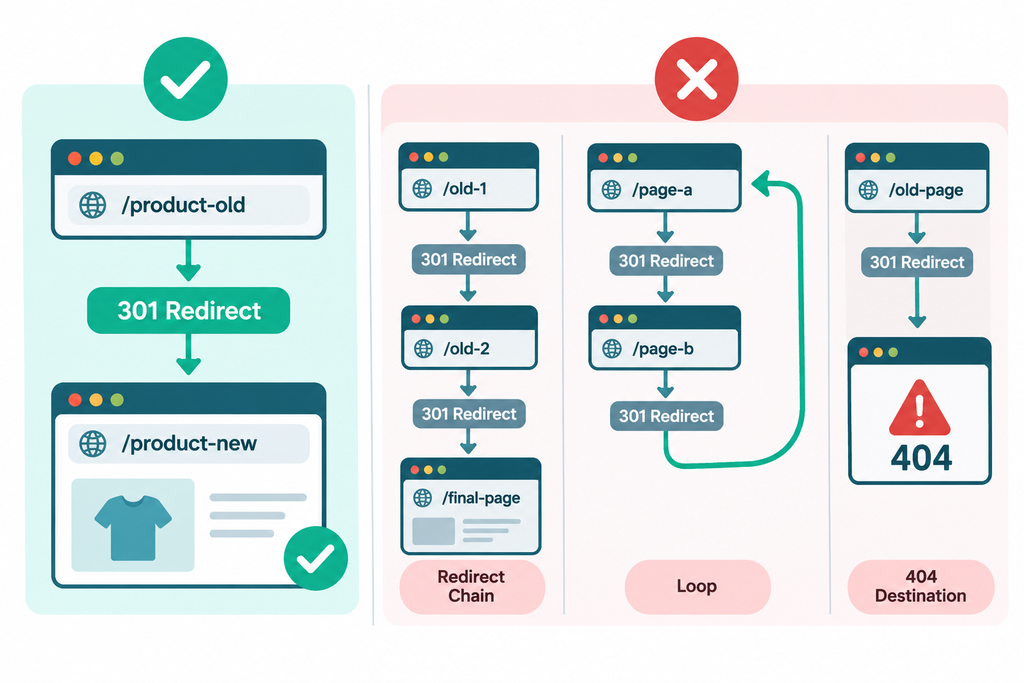
The acceptance test: each mapped old address should reach its intended live page through one permanent redirect, ending in a Hypertext Transfer Protocol (HTTP) 200 response, which means the page loads. Retained and retired addresses are checked separately.
A pass looks like /product/example/ returning 301 once and landing on a working page at /products/example. A fail is a chain of two redirects, a loop or a destination that returns a 404.
What Shopify Redirect Rules Need Testing?
Shopify’s redirect documentation describes how redirects are created and where they cannot apply. A redirect generally needs the old path to return a 404, and reserved paths can block one. Every row of the map therefore needs checking on the actual store.
Redirect chains should be flattened so each old address points straight to its final destination, and redirects should stay in place as long as practical. Teams that need hands-on help with bulk imports and testing can hire Shopify developers.
Validate the redirect map before launch. Eplanet Soft offers Shopify development and search optimization support for stores moving from WooCommerce, so each old address can reach a relevant destination.
What Should the WooCommerce to Shopify Migration Launch Checklist Cover?
Launch should be rehearsed first on a private test copy of the store. Ownership, backups, rollback conditions and a low-risk launch window need agreement before the day itself.
Functional testing covers:
- Navigation and internal search
- Product availability and variants
- Checkout, payments, taxes and shipping
- Order confirmation emails
- Mobile layouts
Search testing then runs on the live domain. Verify redirects, canonical tags (the tags that name the main version of a page), search engine access to the pages, and the generated sitemap. Submit the sitemap through Google Search Console, and compare analytics events and consent settings with the baseline.
| Check | Owner | Expected result |
| Priority redirects | SEO lead | One redirect to a working page |
| Test order | Developer | Order and payment confirmed |
| Canonical tags | SEO lead | Each live page names itself as the main version |
| Purchase event | Analytics owner | Revenue matches the order |
Scope can reach beyond the storefront, into inventory, customer relationship and fulfillment systems. Teams planning that work can look at ecommerce website development. Design changes belong in a separate phase, so website redesign services should be scoped apart from essential migration work.
How Should Search Performance Be Monitored After Launch?
Monitoring begins the moment the store goes live. Priority redirects, crawl errors, indexing, organic landing pages, sales and conversion events should be checked immediately, then reviewed at regular intervals against the baseline.
Group issues by page type and business impact. A missing high-revenue product deserves attention before a low-value retired address. Each fix should be recorded and retested.
Some drops are not ranking problems at all. A tracking fault and a checkout fault can look like a ranking drop in a traffic report. Comparing the store’s own order records with analytics purchases separates them quickly. For wider causes, the Eplanet Soft guide to how to recover organic traffic after a drop is a useful companion.
| Metric | Baseline | Current | Action |
| Organic visits to top products | Exported before launch | Weekly figure | Investigate gaps |
| Indexed pages | Sitemap count | Search Console count | Resubmit sitemap |
| Organic revenue | Previous period | Current period | Check tracking first |
No recovery date can be promised. Reviewing analytics and Google Analytics 4 (GA4) tracking keeps the data trustworthy, and SEO services for migrations can add specialist support.
Is Ecommerce Replatforming Better In-House or With Specialists?
Ecommerce replatforming suits an internal team when platform, SEO and integration skills already exist and the catalog is simple. Specialists become more valuable when catalogs are large, integrations are custom or the launch carries high revenue risk.
| Model | Suitable situation | Internal responsibility | Trade-off |
| In-house | Small catalog, experienced team | Everything, including testing | Lowest outside spend, heaviest use of staff time |
| Specialist support | Complex data, integrations or redirects | Approvals and content decisions | Faster verification, with an outside scope to manage |
| Hybrid | Capable team with a skill gap | Day-to-day work and ownership | Targeted help, with clear handoffs required |
Once the store is stable, attention can turn to growth. Conversion rate optimization raises the share of visitors who buy, and the Eplanet Soft guide on how to raise Shopify conversion rate applies once the move is complete. More SEO articles on the Eplanet Soft blog cover longer-term search work.
What Is the Next Step After Planning a Migration?
Order matters more than any single tactic: baseline first, content decisions second, data transfer third, redirect checks fourth, launch testing fifth and monitoring last. Each stage produces evidence the next one depends on.
Careful migrations reduce search disruption, but no process guarantees rankings. Documented maps, tested redirects and a clear baseline make problems visible and fixable.
Scope a safer migration. Eplanet Soft can assess catalog complexity, redirect needs and launch testing for a WooCommerce to Shopify move, drawing on its Shopify development and search optimization services. Get a Free Quote.